Apple recently released iOS 26.1 with a handful of refined features, visual updates, and tweaks to everyday tools. Now, the company is moving forward with the next version—iOS 26.2—which is currently available only in beta for developers and public testers. Although not as expansive as earlier releases in the iOS 26 cycle, this upcoming update introduces several meaningful improvements that enhance usability, personalization, productivity, and app experience.
Below is a complete breakdown of everything new in iOS 26.2, what to expect if you join the beta program, and how this update continues to shape Apple’s evolving software ecosystem.
Before Installing the iOS 26.2 Beta
iOS 26.2 is still in active testing, which means:
-
The software is unfinished.
-
Bugs, performance hiccups, and app issues are common.
-
Some features may change, improve, or be removed before public release.
Anyone can install the public beta, but doing so requires caution. If the beta causes serious problems, the only guaranteed way to return to the stable version is performing a factory reset—unless you made a full backup on a Mac or PC before updating.
So, if you plan to try iOS 26.2 early, make sure your data is safely backed up.
What’s New in iOS 26.2
Although not a major software overhaul, iOS 26.2 introduces a variety of refinements that improve personalization, system animations, app functionality, and day-to-day convenience.
1. New Liquid Glass Slider for the Lock Screen Clock
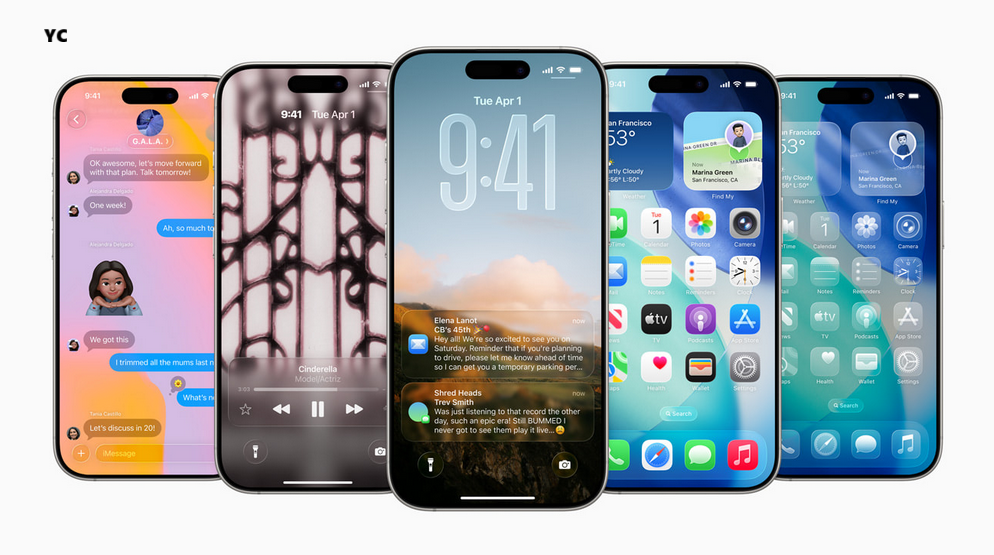
iOS 26 introduced the “Liquid Glass” interface—a modern, fluid style that creates a glass-like visual effect throughout the system. iOS 26.1 allowed users to choose between Clear or Tinted versions of the effect, with the latter adding opacity and a frosted look.
iOS 26.2 expands customization further by adding a slider specifically for the Lock Screen clock. This gives users more fine-tuned control over the intensity and transparency of the Liquid Glass effect on the clock, allowing for more visual balance depending on the wallpaper and personal style.
While it doesn’t apply system-wide—yet—the new slider shows Apple is continuing to refine and deepen Liquid Glass personalization.
2. Updated Liquid Glass Animations
Apple is also experimenting with smoother, more dynamic Liquid Glass animations in iOS 26.2. Early testers report:
-
More responsive transitions
-
Bounce-like movement reminiscent of Apple’s June preview demos
-
Improved fluidity when interacting with widgets, the Lock Screen, and system menus
These adjustments make the Liquid Glass interface feel more polished and lifelike, reinforcing the visual identity Apple introduced with iOS 26.
3. Liquid Glass Comes to the Measure App
Apple is gradually redesigning many built-in apps to match the new Liquid Glass aesthetic. In iOS 26.2, the Measure app receives updated visual components inside its Level tool.
-
The traditional white level indicators are replaced with Liquid Glass bubbles.
-
In beta 3, Apple refined the design so the numeric reading is always visible—even when graphical elements overlap.
It’s primarily a visual upgrade, but it helps unify the entire OS under the new design language.
4. Alarms for High-Priority Reminders
For years, reminders have been easy to overlook—especially when focused notifications or Do Not Disturb modes are active. iOS 26.2 aims to fix that by introducing Alarm-style alerts for “Urgent” reminders.
When marking a reminder as Urgent, you’ll be asked whether you want the system to schedule alarms and timers. Instead of a simple notification ping, your iPhone can now:
-
Play a repeating alarm
-
Continue alerting until dismissed
-
Make critical reminders harder to miss
This is especially useful for medication schedules, important deadlines, or time-sensitive tasks.
5. AirDrop Codes (Early Implementation)
A new section called “Manage Known AirDrop Contacts” appears in iOS 26.2 beta 3, hinting at an upcoming AirDrop enhancement.
The description reads:
“You will automatically appear for 30 days to people you have shared a one-time code with.”
This suggests Apple is developing a system where:
-
Users can share a one-time code with someone
-
Both devices will recognize each other for 30 days
-
AirDrop visibility and discovery become smoother and more secure
The feature cannot be fully used yet, but the settings page confirms it is coming in a future update, possibly in the final release of iOS 26.2.
6. Updated Sleep Score Metrics (with watchOS 26.2)
For Apple Watch users, iOS 26.2 pairs with watchOS 26.2 to refine the Sleep Score system introduced earlier. Sleep Score analyzes:
-
Sleep duration
-
Bedtime consistency
-
Interruptions
Apple has adjusted the scoring scale to more accurately reflect sleep quality. The revised categories are:
-
Very Low: 0–40
-
Low: 41–60
-
OK: 61–80
-
High: 81–95
-
Very High: 96–100
These ranges are broader and more evenly distributed, allowing users to better interpret their nightly sleep performance at a glance.
7. Drop and Drop Returns to Slide Over (iPadOS 26.2)
For iPad users running iPadOS 26.2, Apple continues restoring Slide Over’s full feature set.
Slide Over lets you keep an app floating at the side of the screen for quick access. iPadOS 26.2 beta 3 reintroduces drop and drop, a function that allows:
-
Picking up an app
-
Dropping it over an existing Slide Over window
-
Instantly replacing that window with the new app
It makes multitasking smoother and more intuitive, especially for users who frequently alternate between communication, creativity, and productivity apps.
8. New Features in the Podcasts App
iOS 26.2 introduces three enhancements to Apple Podcasts, presented in a welcome screen when you open the app after updating:
A. Automatic Chapters for English Podcasts
-
Episodes will include chapters by default.
-
If creators don’t add their own, Apple generates chapters using AI.
-
Creators can disable automatic chapters if they prefer.
B. Podcast Mentions in One Location
When a show references other podcasts, the app will collect those mentions into a single section, making it easy to follow related or recommended content.
C. Organized Link Collections
Podcasters can showcase links—articles, websites, products, etc.—all in one place.
The app may also auto-generate timestamped links from transcript content.
These changes make it easier for listeners to explore content and for creators to provide richer episode information.
9. Improvements to the Games App
iOS 26.2 expands the Games app with three notable upgrades:
A. New Sorting & Filtering Tools
Users can now sort games by:
-
File size
-
What friends are playing
-
Games offering challenges
B. Enhanced Controller Support
More parts of the app can now be navigated using a game controller, reducing the need to switch back to touch controls.
C. Real-Time Challenge Score Updates
Challenge progress updates instantly while playing, creating a more connected and competitive experience.
Overall Impression
iOS 26.2 isn’t designed to revolutionize the platform, but it delivers meaningful refinements across the board. Whether you’re customizing your Lock Screen, trying to avoid forgotten reminders, measuring with Liquid Glass visuals, or exploring new podcast features, this update continues Apple’s approach of polished, user-focused enhancements.
As testing continues, more tweaks may appear, but even now, iOS 26.2 is shaping up to be a solid, practical follow-up to the major iOS 26 release.